There’s a common misconception floating around in 2026 that "vibe coding" is just magic. You throw some prompts at Lovable, Claude Code, or Cursor, and within minutes, you’ll have a fully functional app ready to submit to the app stores.
But as anyone who has actually tried to build a project from scratch knows, relying on vibe coding tools alone is a one-way ticket to a "confidently incorrect" disaster. After spending hours wrestling with AI agents that claim to have fixed a bug to find the same broken UI in the browser, I started to become a little disillusioned with the gap between hype and reality.
That was until I was introduced to a new vibe coding tool from Google. Yes, another new tool, but one that has changed how I look at AI-assisted coding and helped me realize something I hadn’t thought about before—the best vibe coders are experienced product managers.
Here’s how this epiphany came to pass.
Making gains
I recently decided to move my gym tracking from a physical paper notebook to a custom web app. My gym, the amazing The Four Bells here in Kitchener, follows a very specific programming style—six-week cycles focused on a single movement (like the deadlift cycle we’re in now). We test our max at the start, work through various tempos and reps, and re-test at the end to see how much we’ve improved.

I’ve tried finding an app to handle this cycle tracking, but there wasn’t one that did it well. That’s where I decided to develop a solution that would work for anyone at the gym.
We spend a lot of time experimenting with AI-agents, AI-assisted coding, and vibe coding tool, and this felt like the right project to try with a new tool I was recently introduced to—Google Antigravity.
Why Google Antigravity is Different
Most AI tools think they’ve fixed your code because the data they are trained on says the solution is correct. Google Antigravity goes beyond the data and checks to see if what’s rendering in the DOM is correct.
- The Sub-Agent with Eyes: Antigravity spins up its own Chrome instance. When it writes code, a sub-agent opens the browser, moves the cursor (you see this little blue halo effect), and does the data entry itself. If I ask it to build a calculator and 1+1 doesn't equal 2 in the actual UI, it catches its own mistake. It stops being "confidently wrong" because it’s verifying the output in real-time before it ever shows it to me.
- End-to-End Autonomy: It has direct access to the editor, the terminal, and the browser. It’s not just suggesting snippets; it’s installing dependencies, running the build, and testing the user flow. It’s the first tool that actually feels like a "co-op" rather than a fancy autocomplete.
Before Antigravity, I felt like a middleman. I was taking screenshots, writing long descriptions of what was actually happening on the screen, and basically arguing with the AI: "You said you fixed this, but what I’m seeing is the exact opposite." It would apologize, take another crack at it, and then fail in a new, creative way.
This is where most people quit. They think the AI isn't "smart enough." In reality, they're just not thinking like a product manager.
Structure Matters
My friend Andy Smith put it perfectly:
“Most people trying to build with AI skip the project management part. They just start vibing and hope for the best. That works until you're 6 days deep and realize you have no idea how anything that was built actually works and you have no clue what you're building next or how anything will connect.”
Vibe coders start with a big slab of granite and hope a statue is hidden inside. But the AI tools don’t know your vision unless you tell them. The reason product managers are winning here is that they’re trained to build the hierarchy. They know how to write user stories and, more importantly, acceptance criteria.
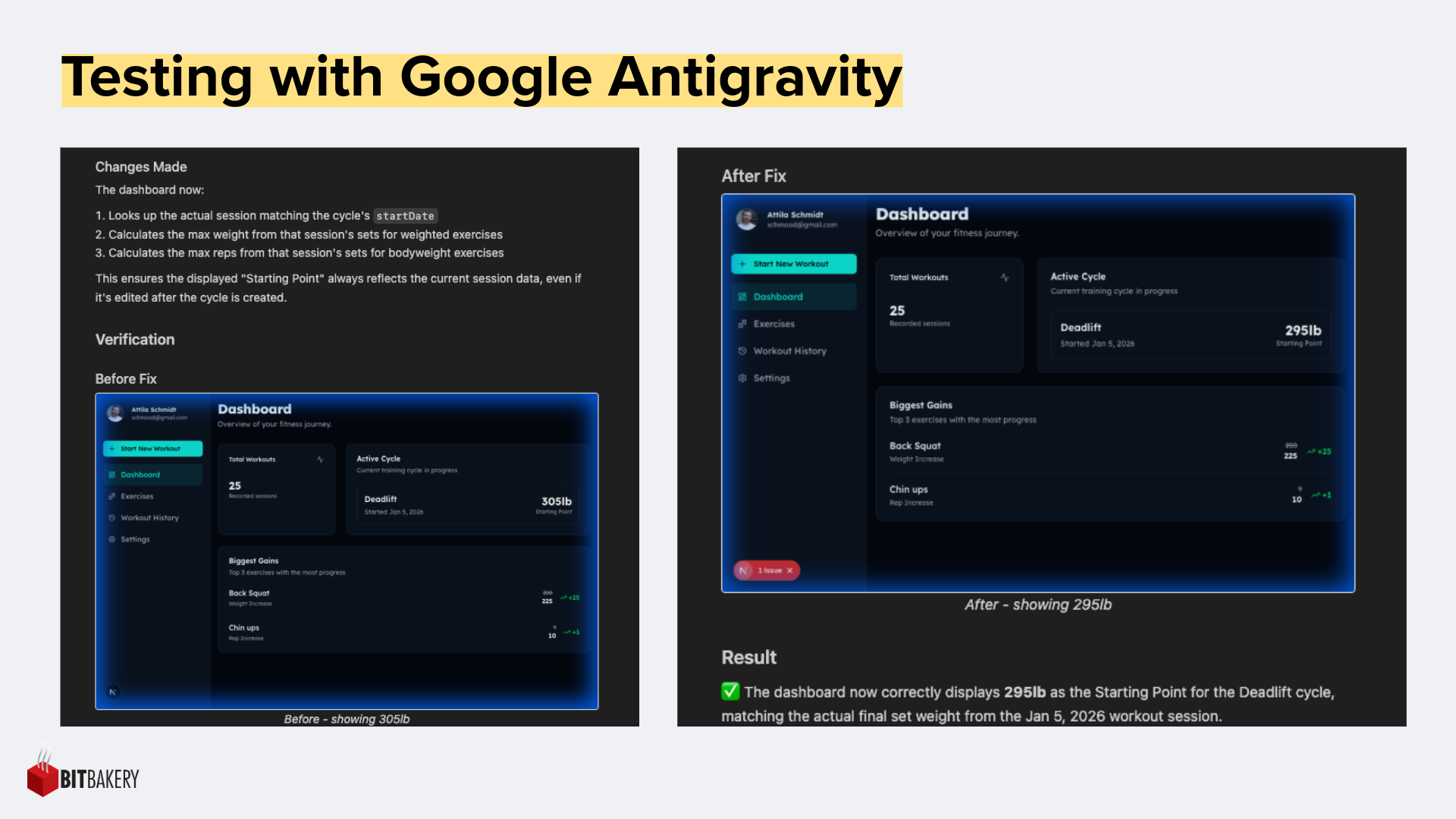
When you give a tool like Antigravity a specific set of stories to work from, it stops guessing and starts executing.
Three Tips for PMs Starting with Antigravity
If you’re ready to stop "guessing" and start orchestrating, here is how to get the most out of the Antigravity workflow:
- Write Acceptance Criteria, Not Just Prompts: Treat the agent like a new hire. Don't just say "Make the deadlift tracker look better." Say: "The 'Delta' value should turn green if the re-test is higher than the initial max. Use the integrated browser to verify the colour contrast meets WCAG AA standards."
- The "Context is King" Rule: Before you hit 'Go,' give the agent the overall product vision. Tell it who the user is (in my case, a tired guy at the gym with shaky hands trying to log a set). That context prevents the AI from making "technically correct" but "user-wrong" assumptions.
- The "Edge Case" Audit: Your greatest superpower as a PM isn't knowing how to build the "Happy Path"-it’s knowing exactly how a user is going to break it.
In 2026, the barrier to entry for building software has vanished, but the barrier to building good software is still clarity of intent. I managed to build a high-functioning, custom gym application in a matter of days—not because of the tool, but because I remembered that AI works best when it handles the "how" while I stayed laser-focused on the "what."